Command line
A description of how to run the test using a Linux or Windows command line.
Generate the token according to the pattern
a. Visit the https://www.base64encode.org/ webpage
b. Select the Encode option and enter the notation ClientID:ClientSecret
c. Paste the result into the example below in place of <TOKENBASE64>
Preferably using notepad or other text editor.
Windows version
curl -X POST -H "Content-Type: application/x-www-form-urlencoded" -H "Authorization: Basic <TOKENBASE64>" https://is.webapi.intercars.eu/oauth2/token -d "grant_type=client_credentials&scope=allinone"Linux version
curl --location --request POST 'https://is.webapi.intercars.eu/oauth2/token?grant_type=client_credentials&scope=allinone' --header 'Content-Type: application/x-www-form-urlencoded' --header 'Authorization: Basic <TOKENBASE64>'d. On Windows run the CMD command line or Shell on Linux
e. Paste the above contents and run by pressing enter
f. In response we get the result and save the contents of the access_token field
Call the business service
a. Using a text editor, we copy the access_token into the business request as follows
Windows version
curl -X GET -H "Accept: application/json" -H "Authorization: Bearer <TOKENOAUTH>" "https://api.webapi.intercars.eu/ic/inventory/stock?sku=ADDFFF&location=KOM"Linux version
curl --location --request GET 'https://api.webapi.intercars.eu/ic/inventory/stock?sku=ADDFFF&location=KOM' \
--header 'Accept: application/json' \
--header 'Authorization: Bearer <TOKENOAUTH>'
b. On Windows run the CMD command line or Shell on linux
c. Paste the above contents and run by pressing enter
d. In response, we get a business result - for example, the availability of goods at a location
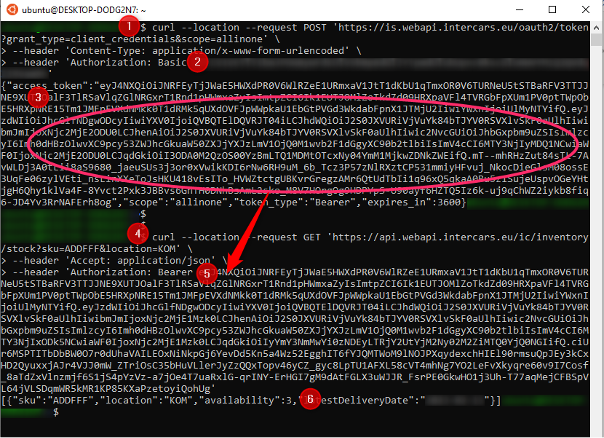
Below is an example of full communication:
- In point 2 we paste the encoded clientID:clientSecret
- In point 3 we are taking the access_token field contents from the response
- In point 4 we prepare our business request (e.g., status query)
- In point 5, we paste the content of the generated access_token
- To get the result: point 6 in the response